

Hakimo Insights Dashboard

Get Portfolio-Wide Insights Across All Your Properties

Stop managing properties in silos. Hakimo centralizes security data from every site into one view, showing you where incidents happen, which locations need attention, and how your spend is actually working.

Helping companies of all sizes, from Fortune 500s to small businesses, improve their security operations
Tangram logo with an orange triangular shape above the blue text 'tangram'.
Icon
Mission-First-Housing-Group
SoLa-Rentals
Transwestern-Logo
dominium-logo
Kennedy-Wilson
Avanue-5
American-Landmark
Abstract triangular shapes with red, gray, blue, and black layers forming a dynamic pointed design.
Greystar logo
Hand-drawn flowchart depicting process steps from gas-fired kiln to drying and then to hydrogen-firing adaptations.
PORTFOLIO OVERVIEW

Your Entire Security Portfolio, at a Glance

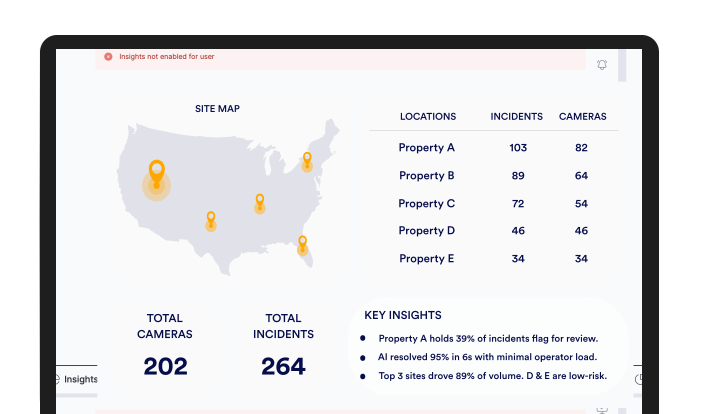
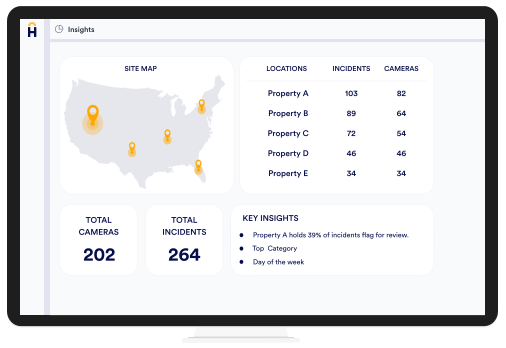
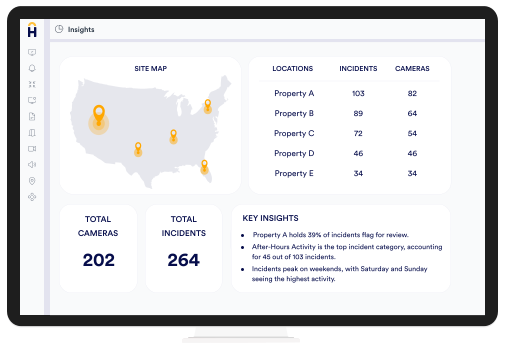
See every property you manage in a single live view. Hakimo pulls together locations, active cameras, and incidents into a single portfolio overview, then surfaces the insights that matter: which sites drive the most activity, how quickly alarms are resolved, and where your risk is concentrated.

That clarity changes how you operate. Instead of reacting to alarms one at a time, you spot the trends early, direct resources where they actually matter, and back every security decision with data from across the portfolio. One view, every property, nothing slipping through.

PROPERTY LEVEL VIEW

Get Deeper Insights Into Each Property You Manage

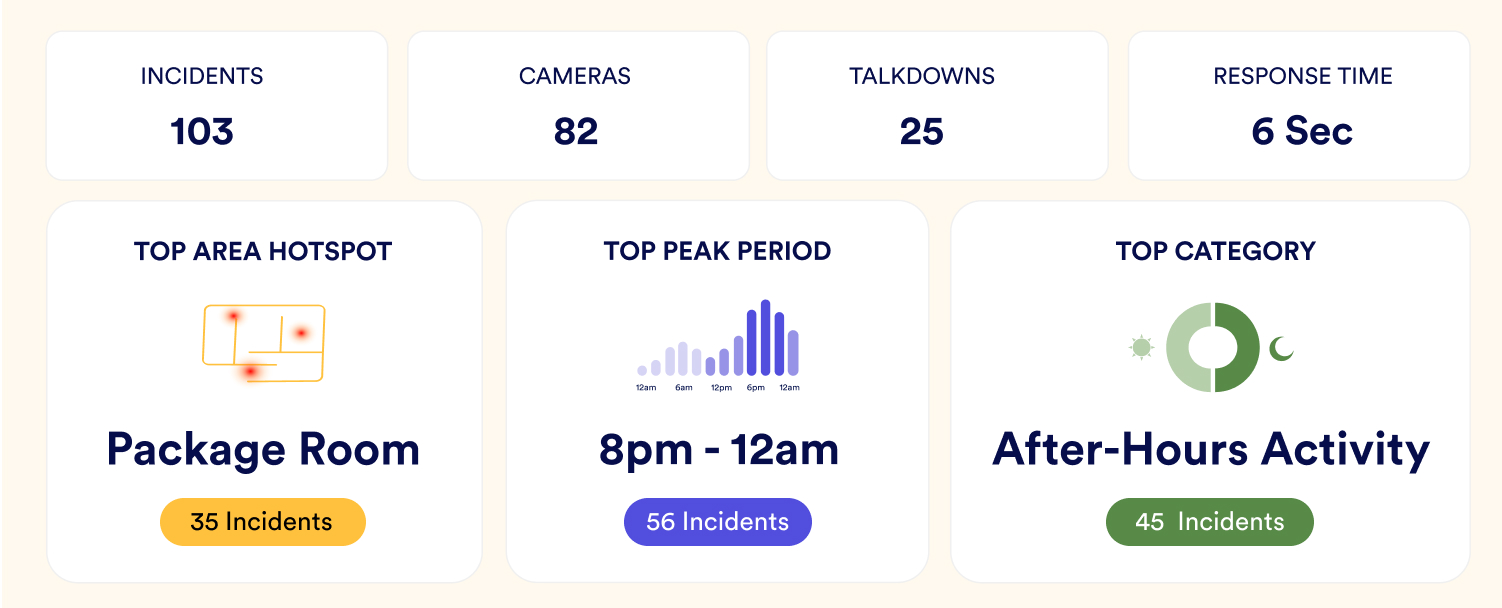
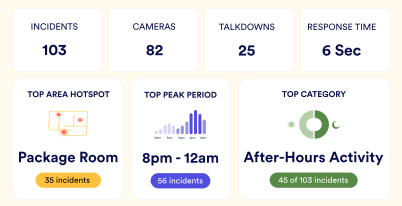
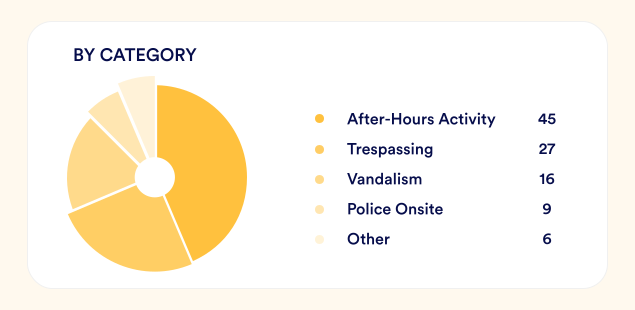
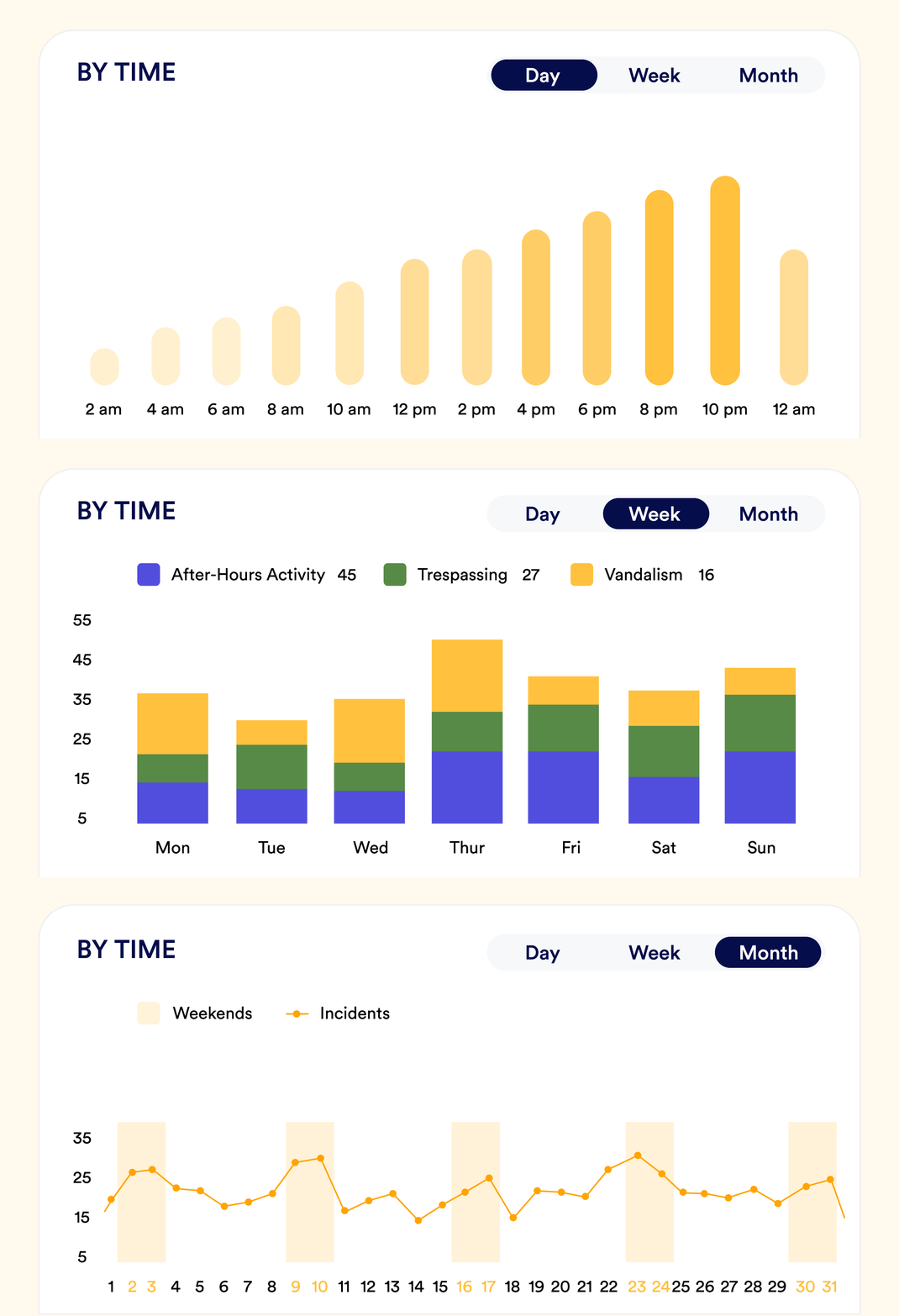
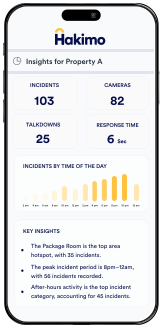
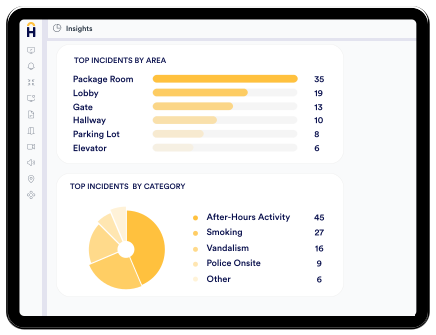
Drill into any property and the entire month's insights come into focus. Incidents, cameras, talkdowns, and response time up top, then the deeper signals underneath: your busiest area, your riskiest window, and the activity type eating most of your alarms. Everything your team needs to fix what matters.

Know the Data Behind Every Incident

The portfolio view tells you where to look. The property view tells you what is happening and when. Every chart on this page answers a different question your security team should be asking every month.

SIMPLE. FAST. RELIABLE

Insights for Every Industry

Security challenges are not the same in a multifamily building, a car dealership, and a hotel lobby. Hakimo is designed to adapt — the same AI engine, tuned to the specific patterns, risks, and workflows of your industry.

Multifamily Residential

See every building end to end, from package rooms to parking lots, with eyes on every corner around the clock.

Hospitality

Protect guests around the clock without disrupting the experience, stopping trouble before it ever reaches them.

Know More

Property Management

Centralize security across dozens of sites and surface the incidents that actually need your attention first.

Know More

Automotive

Guard every dollar of inventory overnight, catching after-hours intrusions on the lot the moment they happen.

Know More

Construction

Lock down perimeters, equipment, and access points across changing sites, flagging unauthorized entry instantly.

Know More
TESTIMONIALS

Security challenges are not the same in a multifamily building, a car dealership, and a hotel lobby. Hakimo is designed to adapt — the same AI engine, tuned to the specific patterns, risks, and workflows of your industry.

Success Stories

Frequently Asked Questions

What is the Hakimo Insights Dashboard?
hakimo-openhakimo-base

The Hakimo Insights Dashboard gives organizations a centralized view of incidents, response times, cameras, properties, and security performance across their portfolio.

What metrics can I track with the Insights Dashboard?
hakimo-openhakimo-base

Users can monitor incident trends, response times, talkdowns, camera activity, busiest locations, highest-risk periods, and incident categories across their properties.

Can I monitor multiple properties from one dashboard?
hakimo-openhakimo-base

Yes. Portfolio and security teams can view multiple properties from a single interface, making it easier to compare activity and security performance across locations.

How does the dashboard help improve security operations?
hakimo-openhakimo-base

The dashboard highlights recurring risks, identifies problem areas, measures operational performance, and helps teams make data-driven decisions about security resources and operations.

Can I analyze incident trends over time?
hakimo-openhakimo-base

Yes. Hakimo allows teams to analyze security activity over time, helping them identify recurring patterns, high-risk locations, and periods when incidents are more likely to occur.

Does the dashboard provide real-time visibility?
hakimo-openhakimo-base

Yes. The Hakimo Insights Dashboard provides visibility into security activity and operational data, helping teams stay informed about what is happening across their properties.

Which industries use the Insights Dashboard?
hakimo-openhakimo-base

The Hakimo Insights Dashboard supports multifamily residential, automotive dealerships, hospitality, construction, self-storage, corporate offices, universities, and other multi-site organizations.